 Mitra Home
 Your family's paperwork, handled at home.
Mitra Home keeps track of bills, statements, insurance, school and doctor dates, birthdays and lists for the whole family. It runs on your own computer, so your papers never sit on someone else's server.
Download now (public beta, 0.138.0): Windows · Mac (Apple silicon) · Mac (Intel)
- Free, no account
- Your data stays on your PC
- Works without AI
- Phone apps: Google Play · App Store
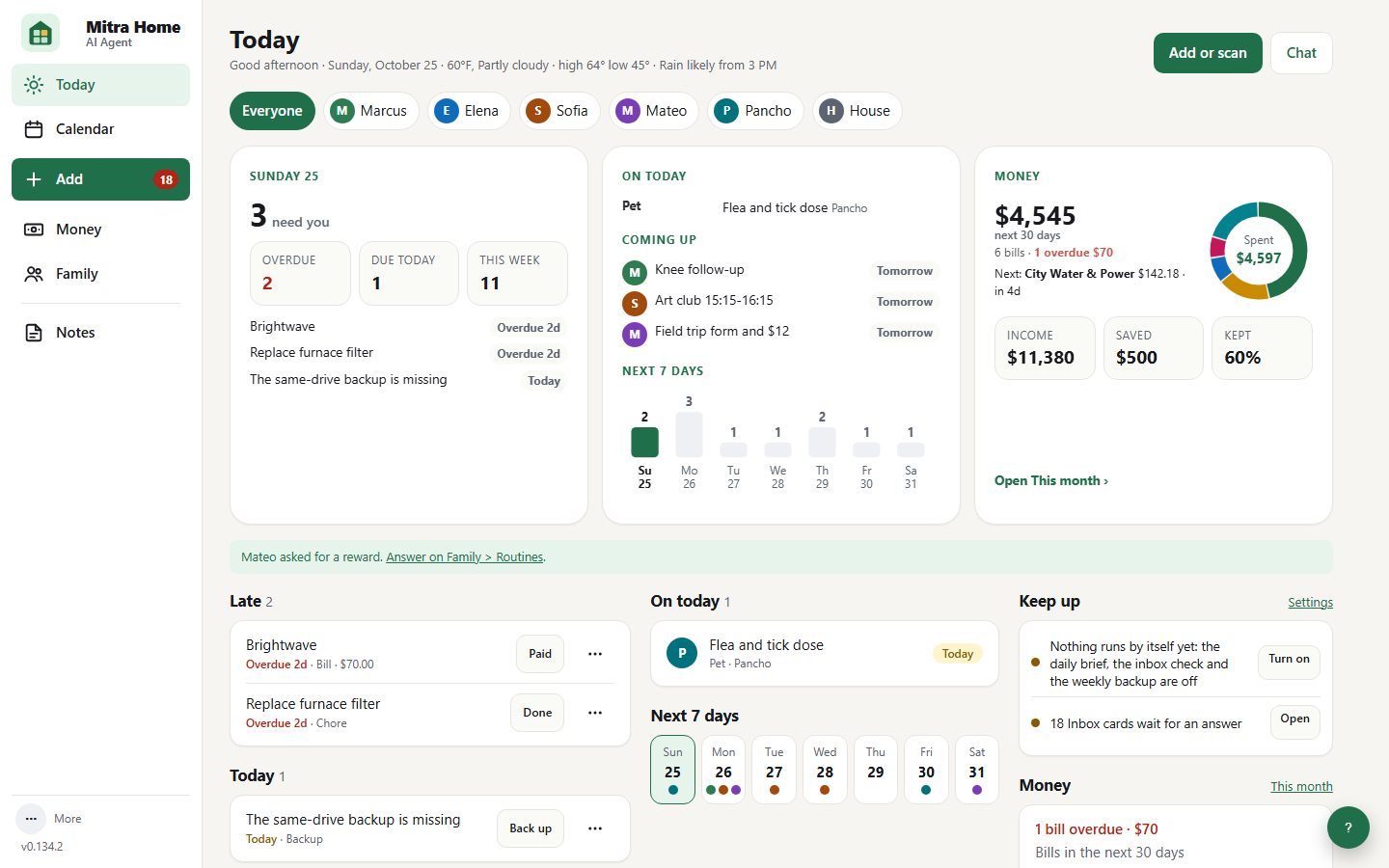
See it before you install it.
What the video shows (no sound)
- Title: Your family's paperwork, handled at home.
- Today, on a computer: open it, and you know what needs you. Bills due, appointments, chores and who they are for, on one page.
- Calendar: everyone's dates, in one calendar. School, classes, doctors, birthdays and due dates, from your own records.
- On your phone: Money and the family wallet, in your pocket. What to pay, what you keep, and where every card and plate number is.
- Mitra Wall: an old tablet becomes the family's screen. The week, the weather and everyone's chores, on the kitchen wall.
- End: runs on your own computer. Your papers stay at home, not in someone else's cloud.
One place for the things families forget
Drop in a bill or a statement. Mitra Home reads it, files it and reminds you before anything is due.
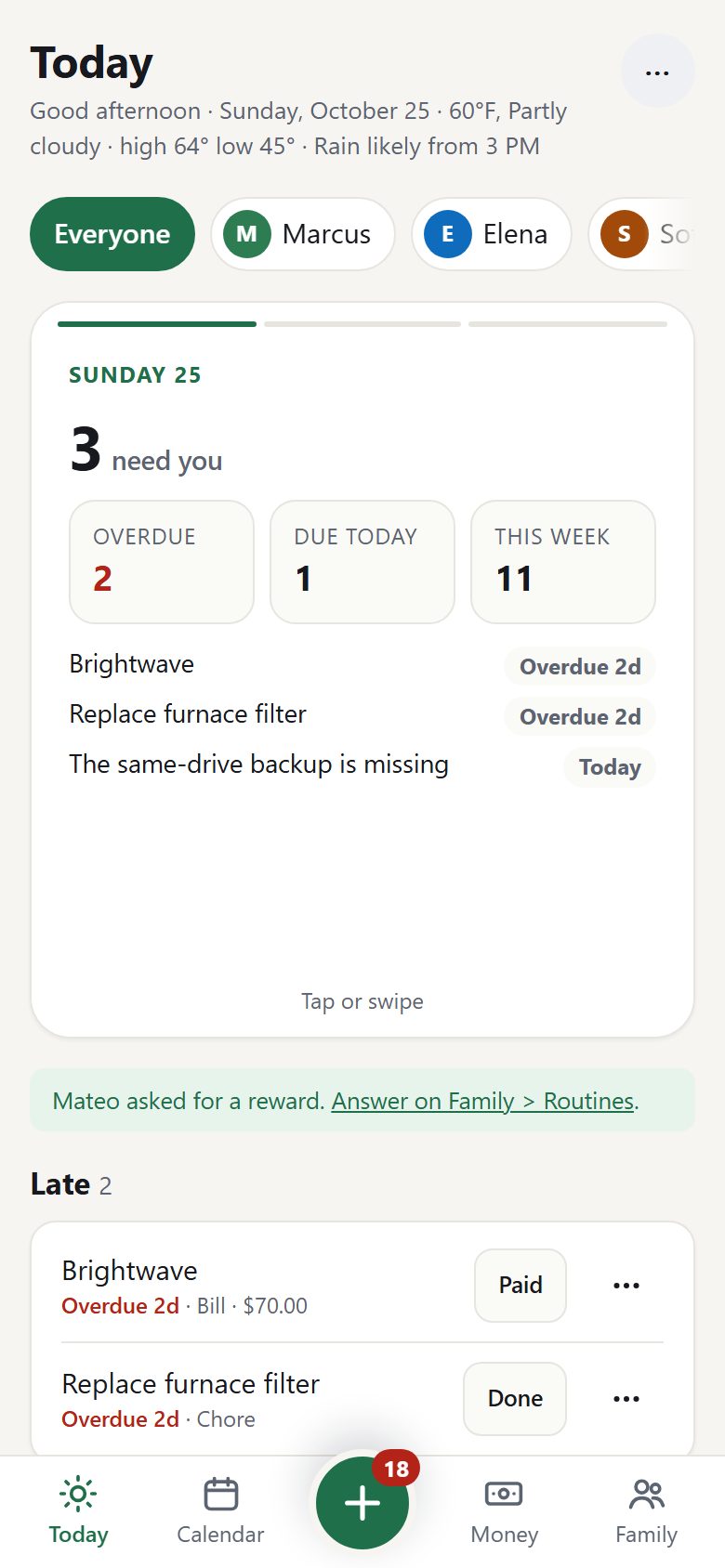
Open it, and you know what needs you.
One list for the day: what is late, what is due today and this week, what is on the calendar and the money ahead. Tap Done or Paid right there, or snooze a row for a day, a week or a month.
- Late papers, bills and appointments first
- One person at a time, or the whole family
- Today's weather, a short brief each morning, a family digest each week
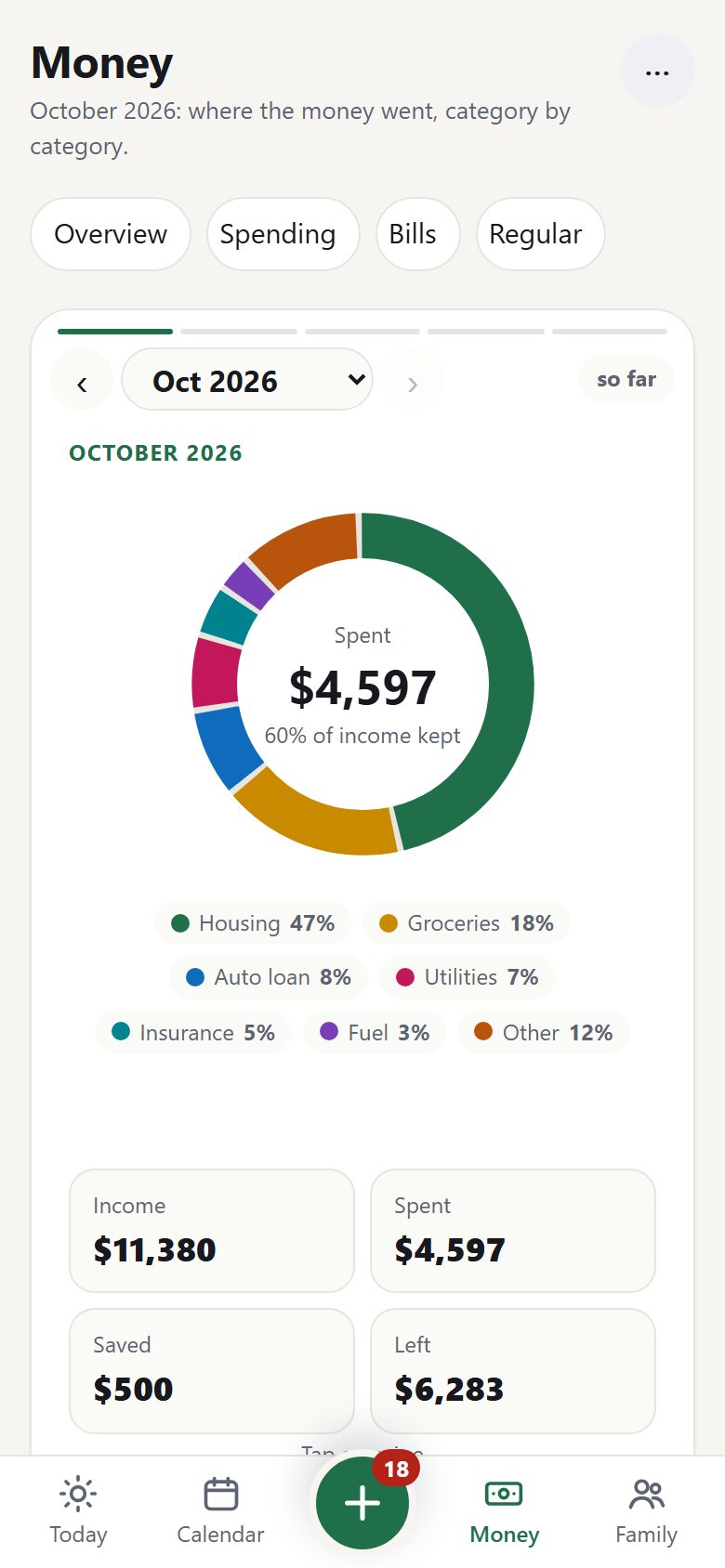
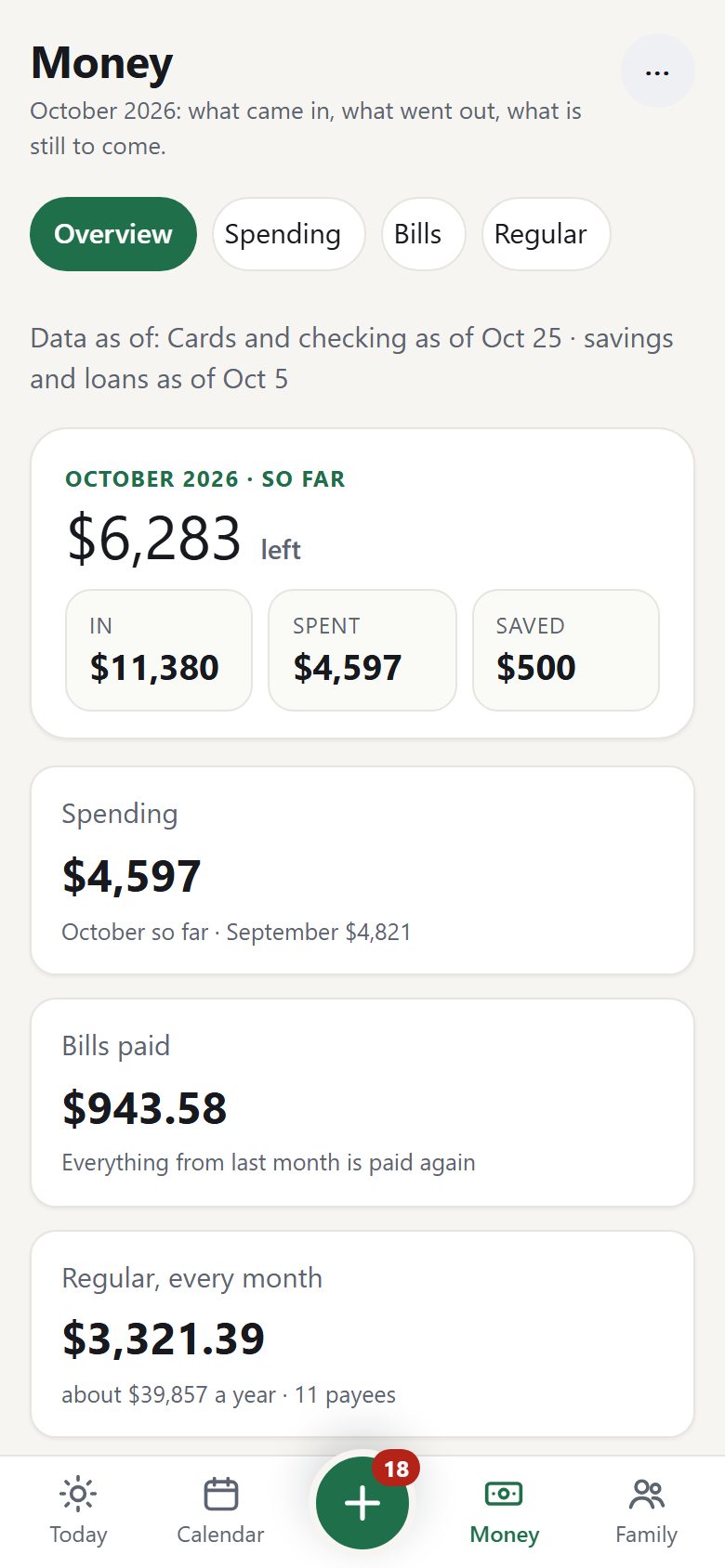
See where the money went, without a spreadsheet.
Drop in your bank and card statements, or the download your bank offers. Money opens on four pages: Overview (the month so far), Spending (each category against last month and last year), Bills (what is paid and what has not come yet) and Regular (what keeps coming, a month and a year). Spending is counted one way everywhere: refunds come off, tax has its own line, and moving money between your own accounts or paying a card never counts.
- The Ledger: every line from every account, with cash-flow tiles; transfers and card payments matched so nothing counts twice
- Budgets, savings goals, net worth by month and what paying a loan off sooner saves
- One zip for your tax preparer; bank PDFs, CSV and OFX / QFX read with no AI
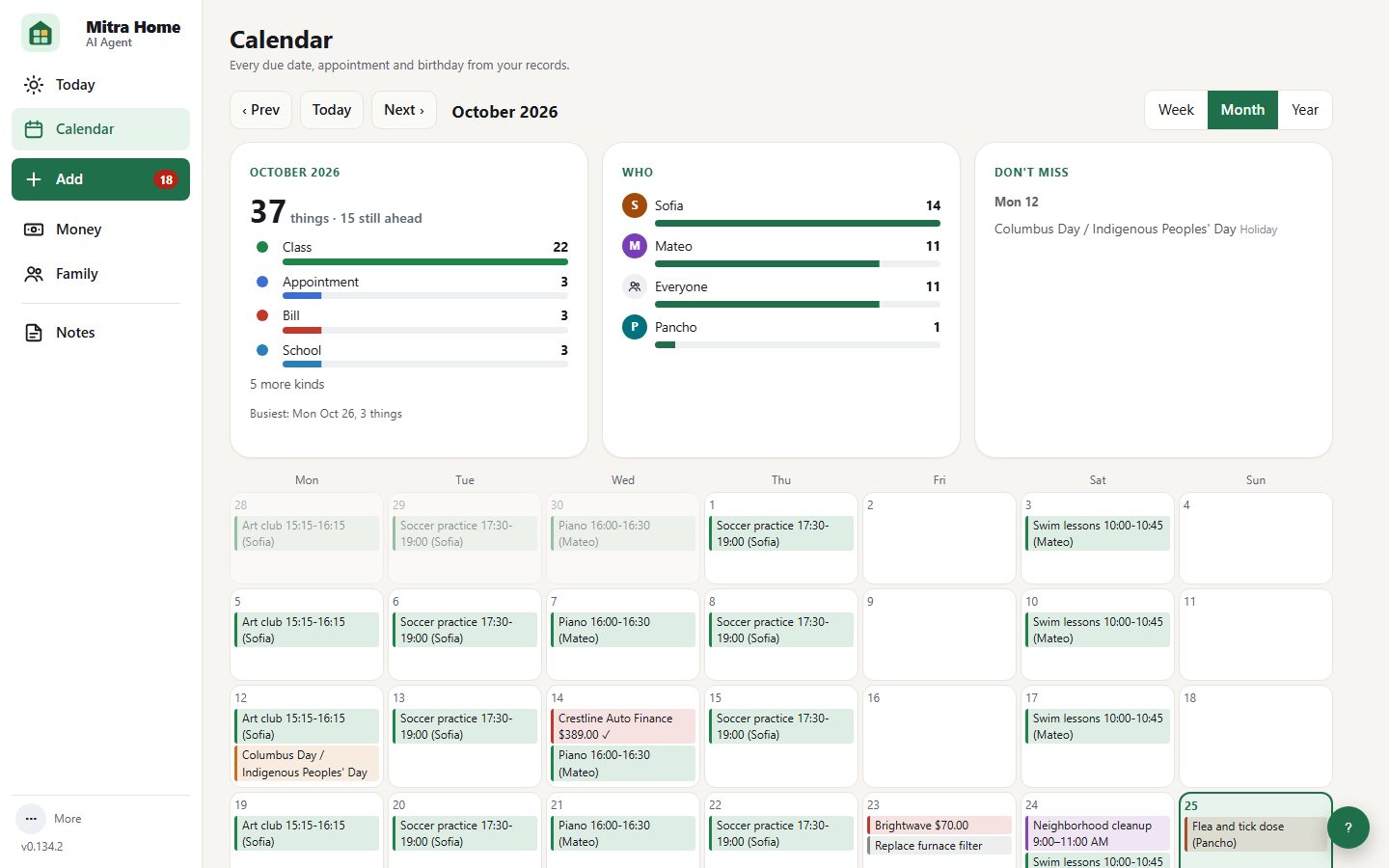
Everyone's dates, in one calendar.
Bills, appointments, classes, school closures, birthdays, renewals and holidays, all from your records. A family dinner from 8 to 8:30 sits at its time. Add your iCloud, Outlook or school calendar to see it alongside. Turn on online look-ups and Mitra Home finds this year's school calendar and adds your state's holidays.
- Week, month and year views
- Weekly classes, school calendars and state holidays
- Your other calendars (iCloud, Outlook, .ics) shown read-only
- Optional copy in Google; a date moved there comes back as a question
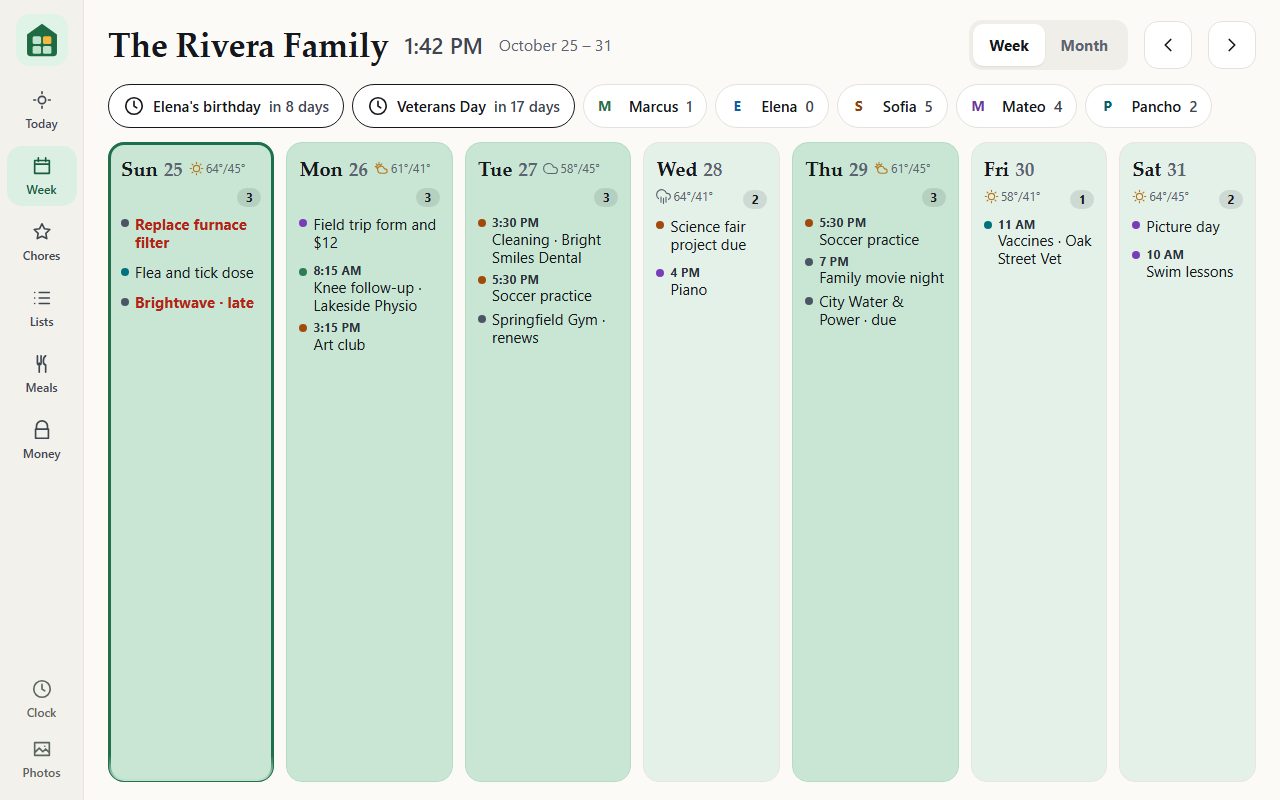
An old tablet becomes the family's screen.
Pair an old tablet or iPad and hang it in the kitchen. It shows the week and the month in everyone's colour, today's plan, what needs doing, dinner and the next three days. Children tick their jobs and earn stars. When nobody touches it, it rests on a clock and the family's photos.
- Tap anything to see it in full; family lists to tick and add to
- The week as a heat map: the busier a day, the bigger and darker its tile, so a packed Tuesday stands out
- Pick the clock on the wall itself: digital, modular, Roman, flip, words, two cities or the kids' day; a red or amber night clock for a bedroom
- Photos that fade, slowly zoom, sit in a collage or as a print with its month; each wall can have its own screen
- When the PC is off, the wall stays on its screen and comes back by itself
- Children's jobs with stars, rewards to spend them on, and an allowance
- Bills without amounts; Money (Overview, Spending, Bills, Regular) opens only with an adult's PIN
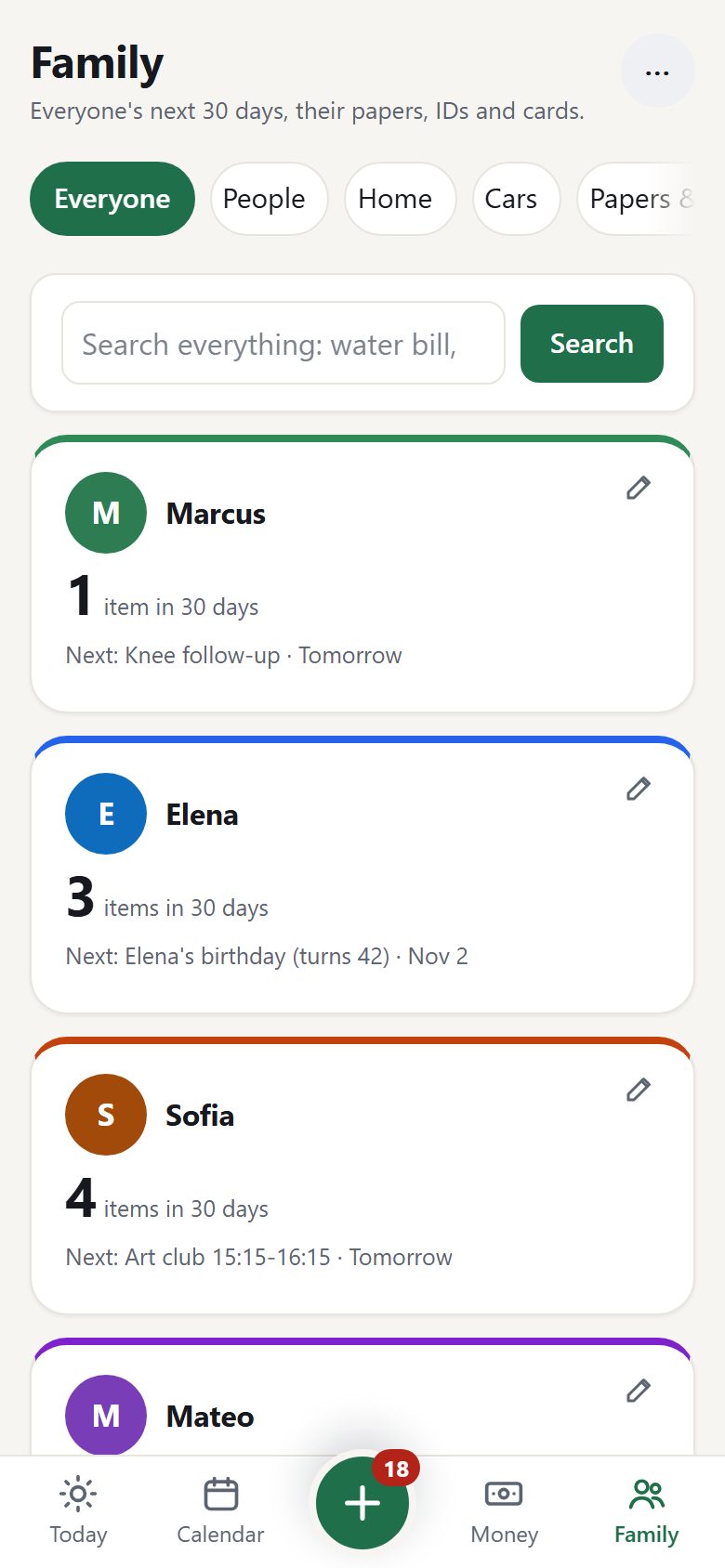
Each person, their own card.
Passports that are about to expire, the dentist, the field-trip form, the dog's flea dose. Family opens with everyone's next 30 days, one search over every record and filed paper, and Needs a look; People, Home, Cars, Papers and the Wallet are one tap away. Children get their own simple page with their jobs, their items and the family lists, and never see money.
- Every adult has their own PIN
- Shared lists to share or print; recipes from a photo or a web address
- An emergency pack for someone you trust, sealed with a passphrase
- Papers filed by year and type, searchable
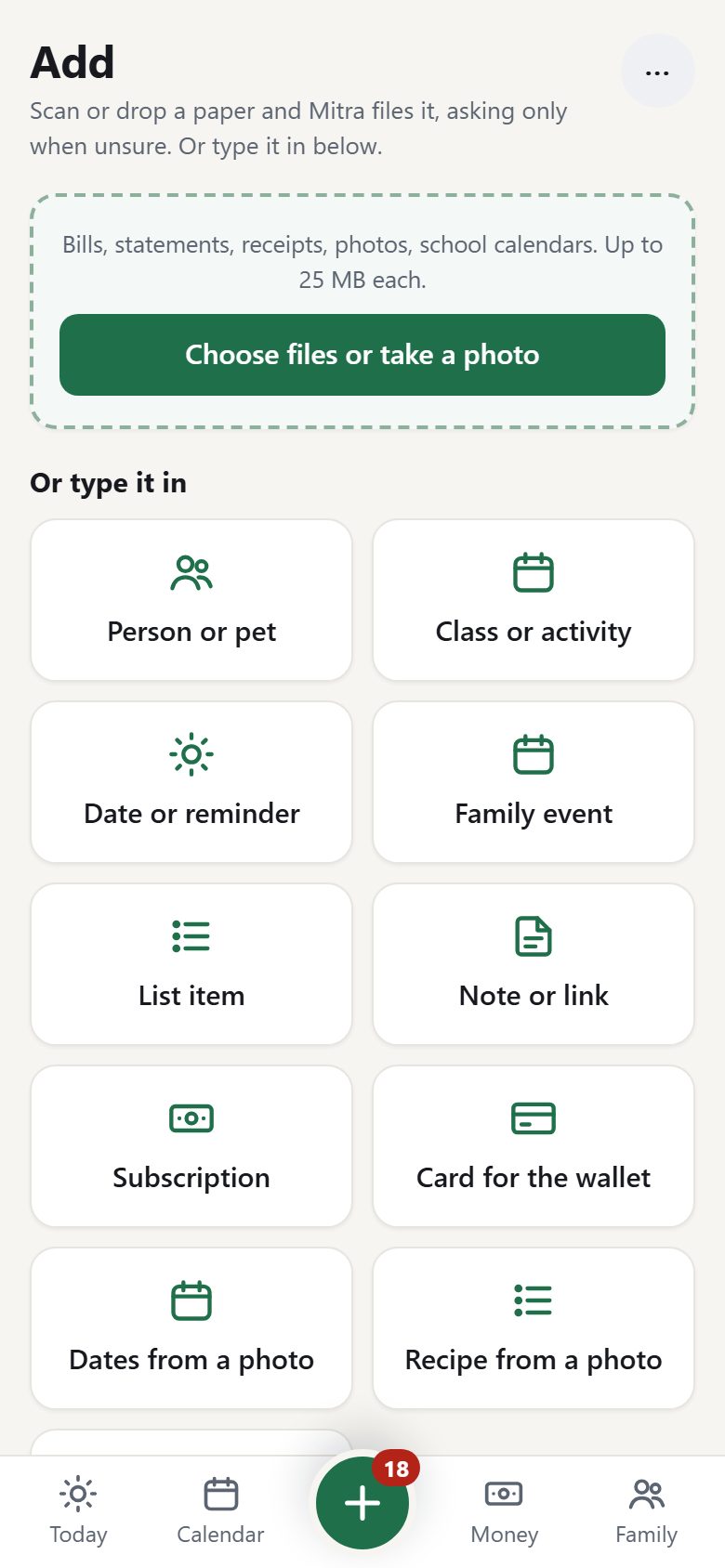
Drop the paper in. Or snap the flyer.
Drag bills, statements, receipts or a photo onto Add, or paste a screenshot. Each file shows its step while it is read and filed; the few that need you wait in plain groups, with a Why? that shows what was tried. Photograph a school letter and its dates are listed for you to tick; photograph a recipe card and it fills in the recipe.
- Drag and drop, paste, take a photo on the phone, or forward the email
- Or tell Chat: "Dr Patel for Sam, Dec 10 at 9:30, with a bill"
- Exact copies are set aside, never filed twice
Every card, and where its number is.
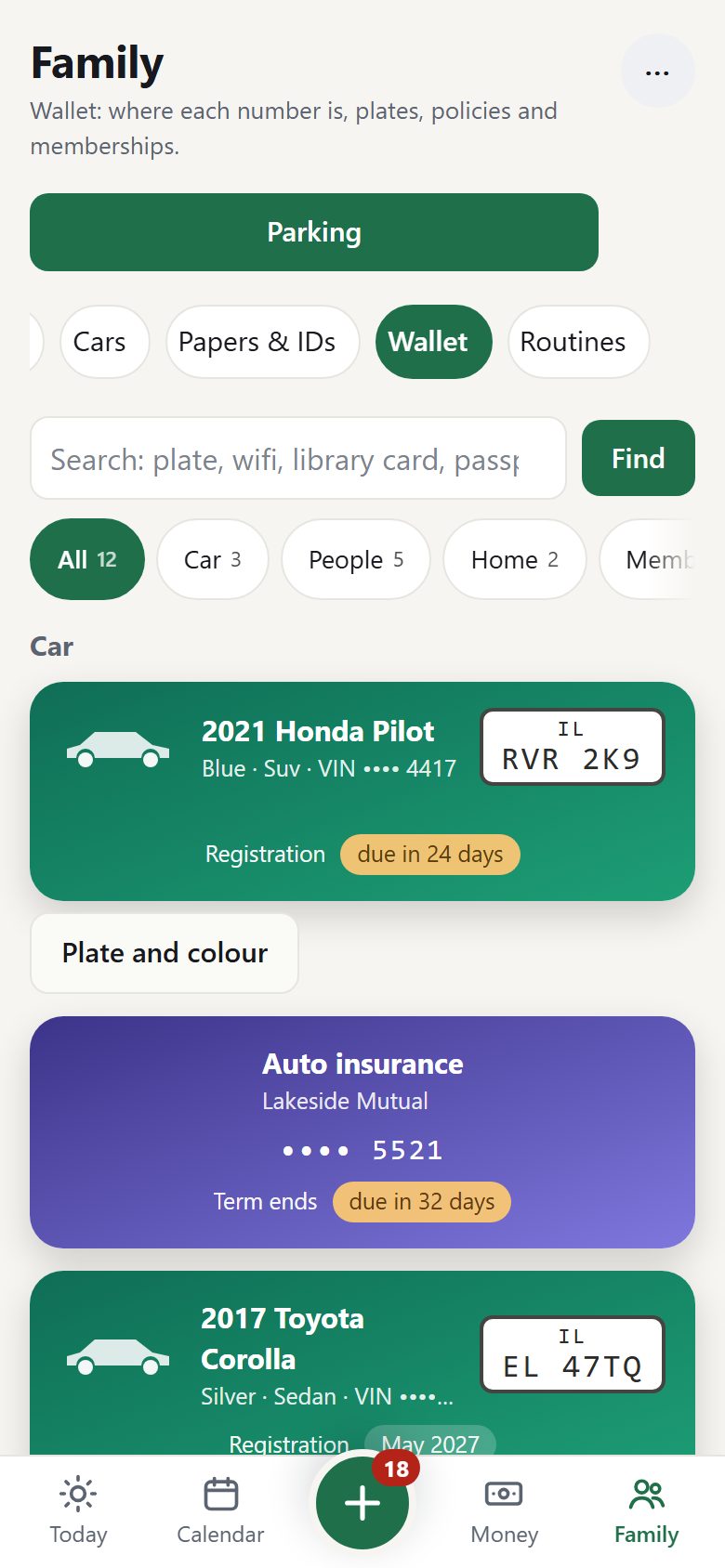
IDs, the car with its plate, insurance, library and store cards, even the Wi-Fi name and trash day, as cards on the PC and the phone. Tap one to see where the number is printed on the real card. The parking meter asks for the plate? It is right there.
- Parking: the plate big on the screen, one tap from the home screen
- Add a card from a photo; the AI fills it in, you check it
- Reminders before a card expires; last four digits for IDs and policies
It checks its own records every week.
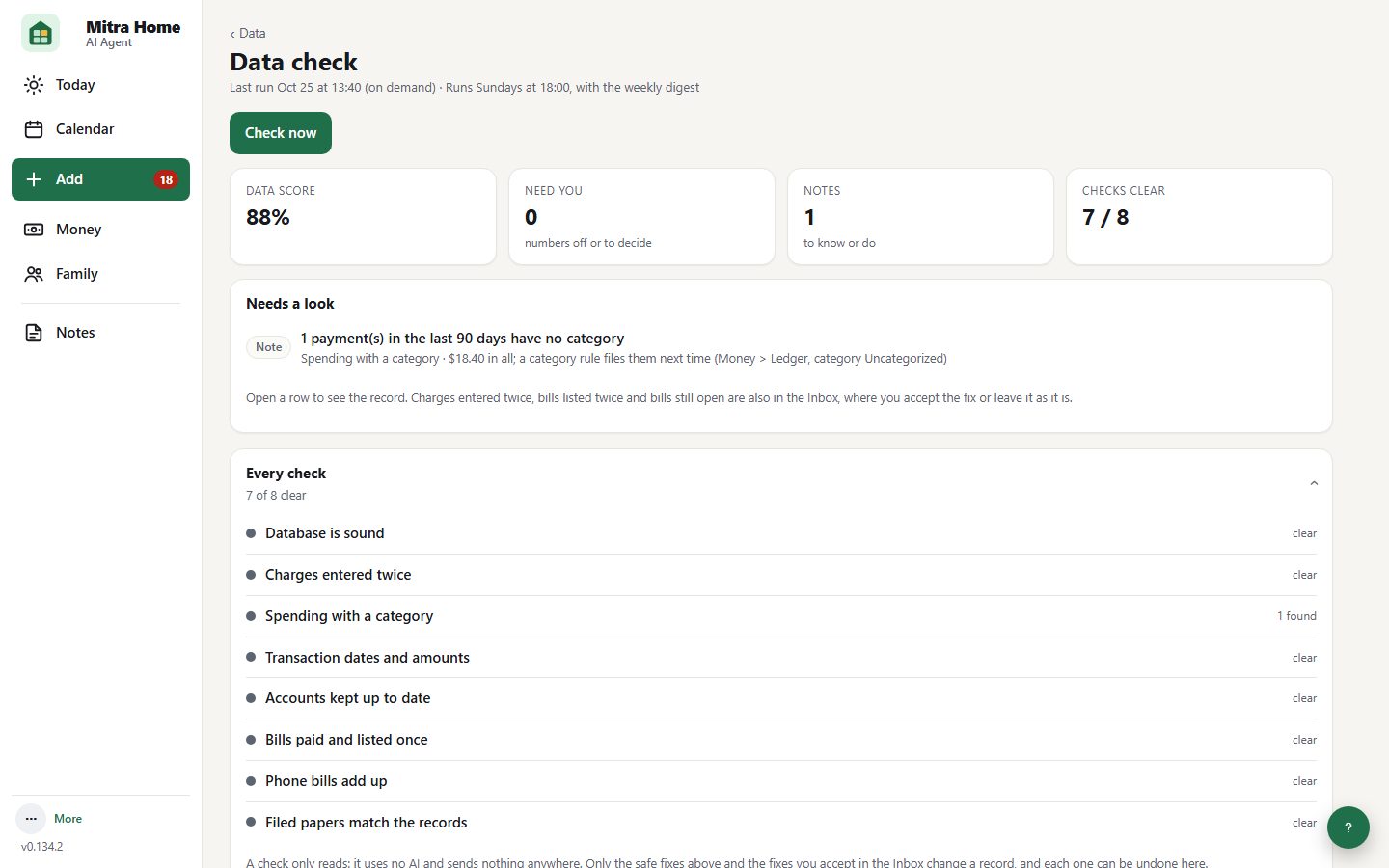
Every Sunday Mitra Home reads through the records for things that do not add up: a charge entered twice, a bill still open a month after it was due, a phone bill whose lines miss the total, a filed paper gone from the disk. What needs you lands on Add to accept or leave; every fix can be undone. With an AI helper set up, it says in plain words what to look at first.
- A data score each week, in the weekly digest and the monthly report
- Safe fixes by itself, everything else waits for a yes
- Rules first, no AI needed; Check now any time
Three steps, no technical knowledge needed
Think of Mitra Home as a tidy family assistant who lives on the computer in your home.
You drop papers in
- Drag a PDF onto Add
- Scan a paper, or add a date, from the phone app
- Or type: "Sam's dentist is Oct 21"
Your PC sorts it out
- Works out what each paper is
- Pulls out due dates and amounts
- Files it away, safely, at home
You get reminded
- Today page: what needs you
- Daily brief and weekly digest
- Phone reminder and calendar
What is "the AI" doing?
Reading a messy bill is hard for a computer. Mitra Home can ask an AI helper of your choice (for example a Claude, ChatGPT or Gemini plan you already have, or a free model on your own PC) to read it. Before anything is sent, names and account numbers are hidden.
No AI? Still useful.
AI is optional. Common bank statement PDFs, bank CSV and OFX / QFX downloads and Verizon phone bills are read with no AI at all, and reminders, lists, calendar and backups all work without it.
Who can see what
Each adult gets their own PIN. Children and guests get their own simple page with their own items and family lists, and never see money.
How the pieces fit together
Your PC is the hub. Everything in your home talks only to it over your own Wi-Fi; every outside service is optional, uses your own account, and is switched on by you.
Papers and dates in
- Add on the PCDrag, drop or paste bills, statements, receipts, photos
- Phone app scansPhotograph a paper; it goes straight to the PC
- Mail and DriveGmail with your label, a mailbox just for Mitra Home, files in a Drive folder
- Telegram and DiscordAdults send a photo or PDF in a private chat
- Bank downloadsStatement PDFs, CSV and OFX / QFX files
reminded
numbers hidden
Optional, your own accounts
- AI helperClaude, ChatGPT, Gemini or OpenRouter key, or a local model on the PC
- Bank syncRead-only through SimpleFIN Bridge; never your bank password
- GoogleGmail read-only, Calendar copy, Drive folder and briefs
- Telegram and Discord botsWhat is due, the week, questions; money only in private chats
- Online look-upsSchools near home, school calendars, weather: ZIP code only
- UpdatesSigned releases, checked once a day if you allow it
Inside your home, not in our cloud
We do not run a server that holds your data. There is no account to create with us.
encrypted
names and numbers hidden
Your own Claude, ChatGPT or Gemini plan or key. Or a local model, and then nothing leaves the PC.
Start simple. Turn on more when you are ready.
Most families only need the Simple set. Advanced shows the extra tools for people who enjoy tinkering. Both are free.
For everyone in the family
- Five-minute setup chat: family, people, home, PINs
- Today: what is due and what needs you
- Bills and due dates, mark as paid
- Money: overview, spending, bills and regular payments
- Add: drop papers, they get filed
- Family calendar, birthdays, appointments
- Shared lists and notes
- Daily brief and weekly family digest
- Phone app on your home Wi-Fi, and a Mitra Wall tablet
- Automatic weekly backup
For the family's "tech person"
- Money in lanes: budgets and loans, trends, tax papers
- Insurance policies and renewal reviews
- Taxes, home office and year-end papers
- Work hours and invoices for consultants
- Choose and switch AI providers
- Google Calendar, Gmail and Drive links
- Telegram and Discord family bots
- Encrypted backups to a second drive
- Region packs, category rules, optional bank sync
- Online look-ups (schools, calendars, weather), off until you turn them on
The Simple / Advanced switch is in Settings > Household profile > How much to show. New installs start in Simple; installs that were already running keep seeing everything (Advanced). It only changes what is shown: nothing is deleted or switched off, and both views are free.
Is it really free?
Yes. No subscription, no account. If you use an AI helper, you pay that provider directly under your own plan or key (often a few cents to a dollar a month for a family), or use a free local model.
What do I need?
A Windows PC or Mac that is usually switched on, about 15 minutes, and optionally an Android phone or iPhone. See Install.
Open source
Released under the GNU AGPL. You can ask for the source of any version on the Source code page, and it goes into a public repository once testing with our first families is complete and the phone apps are approved in the stores, so anyone can check what it does with their data.
Set it up this weekend.
About 15 minutes on a Windows PC or Mac. Answer a few questions, drop in your first papers, and let it remind you from Monday.